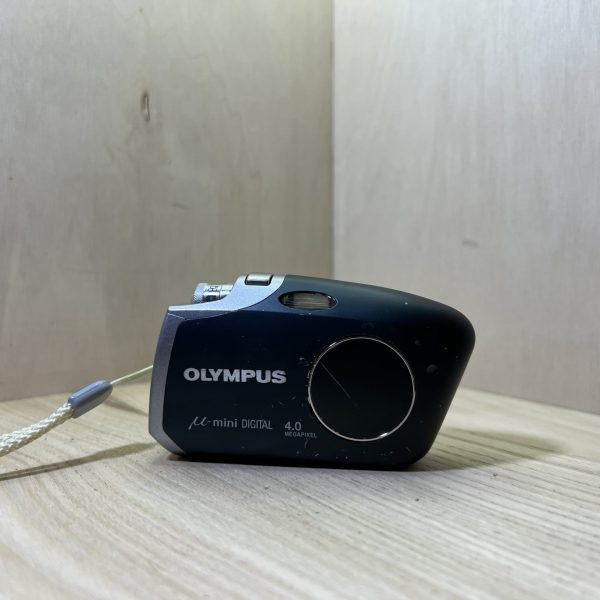
Official Olympus PDF, which Olympus no longer publishes: the link opens the copy kept by Internet Archive’s Wayback Machine.
Getting started
Charging Slide the LI-30B lithium-ion battery into the LI-30C charger plugged into the mains. The lamp lights red while charging and turns green when it’s done, after about 110 minutes.
Battery and card With the lens barrier closed and the screen off, hold down button A and push the battery/connector cover in the direction of the arrow. Push the battery in until its lock button holds it, then pull the card compartment cover towards you and push the xD-Picture Card in the right way round until it locks. Close without forcing: if the large cover resists, the battery is the wrong way round or the small cover has been left open.
Switching on for the first time Turn the dial to the camera position and press POWER: the barrier opens and the lens extends. The first time, the date screen [Y/M/D] appears: set the date via OK/MENU, MODE MENU, SETUP tab, date line. Choose the date order, then the year, month, day, hour and minutes with the arrows, and confirm with OK/MENU.
Language Press OK/MENU, go to MODE MENU, SETUP tab, then the language line, and choose ENGLISH with the arrows. Confirm with OK/MENU. The languages on offer vary with the country of purchase.
Your first photo Check that the battery indicator is green and put the focus marks on your subject. Press halfway: the green lamp stays lit when focus and exposure are locked. If it blinks, release and try again, otherwise press all the way: the lamp blinks red while writing to the card.
What it can do
Fourteen scene modes under the SCENE button: program auto, portrait, landscape, landscape and portrait, night, cuisine, beach and snow, self-portrait, self-portrait with self-timer, behind glass, indoor, candle, sunset and fireworks.
A 2× optical zoom, from 35 to 70 mm in 35 mm equivalent, extended up to 8× by the digital zoom. That is turned on in the CAMERA menu (DIGITAL ZOOM to ON) and makes the image grainier.
Video with sound, dial on the movie position: 320 × 240 or 160 × 120 at 15 frames per second, about 41 seconds in HQ on a 16 MB card. The optical zoom doesn’t work during a movie.
Close-ups: from 20 cm in macro mode, and from 8 to 50 cm in super macro, with the lens at telephoto and the flash off. Both are chosen with the arrow pad.
Burst at about 1.3 frames per second (7 frames in SHQ), the 12-second self-timer, and retouched copies made in the camera in soft focus, fish-eye, black and white or sepia, without touching the original.
The flash
Four modes on the arrow pad: auto (factory setting), red-eye reduction, fill-in flash, which fires for every photo and clears shadows on a face or against the light, and flash off.
With red-eye reduction, the photo is taken about 1 second after the pre-flashes: hold the camera steady.
Range from 0.2 to 2.8 m at wide angle and from 0.2 to 2 m at telephoto. With the flash off in dim light, the shutter speed slows down: put the camera on a tripod.
Good to know
It withstands splashes of water from any direction, but not immersion: don’t wash it, don’t submerge it, no photos underwater. Close the battery/connector cover properly. The battery and accessories aren’t waterproof, and the camera no longer is on the AC adapter.
Format in the camera any card from a brand other than Olympus or formatted on a computer: otherwise it may not recognise it. Formatting erases everything, protected photos included. Panorama requires an Olympus xD card.
Never open the card cover or remove the battery with the camera on or while the lamp is blinking red: you could lose the photo and all the data on the card.
After 3 minutes without use, it goes to sleep: a button, the zoom for example, wakes it. It switches off by itself after about 15 minutes in shooting mode, 3 minutes in playback.
Expect about 100 photos per charge. With the battery out for about a day, the date and time return to the factory settings. In cold weather, keep the camera and the spare battery warm.
µ-mini Digital specifications
Sensor
1/2.5-inch CCD, 4 MP effective, images up to 2272 × 1704
Lens
2× zoom, 5.8-11.6 mm (35-70 mm in 35 mm equivalent), f/3.5-4.9, up to 8× with the digital zoom
Focusing
autofocus from 0.5 m to infinity, macro from 0.2 m, super macro from 8 to 50 cm
Shutter
1/2 s to 1/1000 s, up to 4 s in night scene
Exposure
digital ESP or spot metering, sensitivity auto or ISO 64 to 400, ±2 EV compensation in 1/3 steps
Screen
1.8-inch colour TFT, 134,000 dots
Video
320 × 240 or 160 × 120 at 15 frames per second, with sound (QuickTime Motion JPEG)
Battery
lithium-ion LI-30B, 3.7 V, 645 mAh, LI-30C charger in about 110 minutes, about 100 shots per charge (CIPA standard)
Card
xD-Picture Card from 16 to 512 MB
Body
95 × 55.5 × 27.5 mm excluding protrusions, 115 g without battery or card, splash-proof (IPX4)
Pay by card, Klarna or Google Pay. Your bank details never pass through us.
Free delivery from €150 in mainland France
Elsewhere, the exact rate is shown before you pay.
Tracked parcels, padded by hand
Tracking number by email, oversized packaging: a camera body doesn’t travel like a book.
Tested second-hand
Mechanics, optics, electronics: every item goes through our testing method before it goes online.
A word about cookies
Those for the basket and payment are essential. The others wait for your consent: audience measurement, advertising, visit tracking for our emails. You can withdraw it whenever you like. Details here.