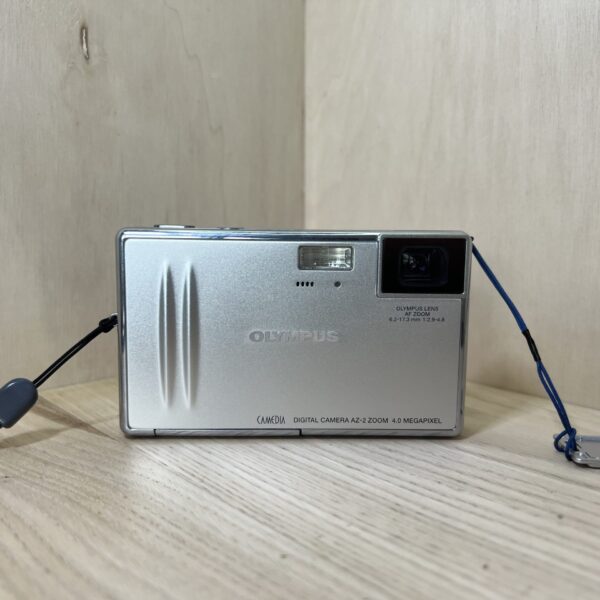
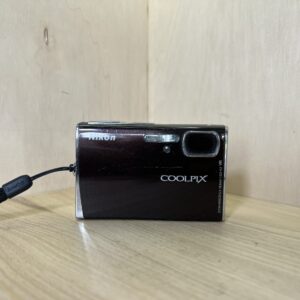
Official Olympus PDF, which Olympus no longer publishes: the link opens the copy kept by Internet Archive’s Wayback Machine.
Getting started
Battery It runs on a lithium-ion battery specified by Olympus, and no other. It goes in with the card under the battery/card cover. If its contacts are damp or greasy, wipe them with a dry cloth.
Charging Charge the battery before first use or after a long rest. When you switch on, a green battery indicator means a good charge, red means a low battery that needs recharging. “BATTERY EMPTY”: it’s flat.
Card It records to an xD-Picture Card, under the same cover as the battery. A card from another brand or formatted on a computer must first be formatted in the camera: MENU, MODE MENU, CARD, FORMAT, YES. Everything is erased, even protected images.
Switching on for the first time Slide the mode switch to camera and press POWER. In MENU, MODE MENU, SETUP tab, choose the language (ENGLISH), then set the date and time, shown in 24-hour format. Confirm each choice by pressing the centre of the arrow pad.
Your first photo Remove the lens cap if it’s on and frame on the screen. Put the AF target mark on the subject and press halfway: the green lamp lights up when it’s sharp, then press all the way. If it blinks, reframe and try again.
What it can do
More than ten Scene modes in SCENE SELECT, in the main menu: night, portrait, landscape, indoor, fireworks, cuisine, sport, beach and snow, sunset, and SELF PORTRAIT for photographing yourself at arm’s length, with the zoom at wide angle.
Super macro focuses from 3 cm, without flash or zoom.
Movies with sound, at 640 × 480 or 320 × 240, at 30 or 15 frames per second. In SHQ, a movie lasts about 8 seconds at most.
In video, a stabiliser reduces camera shake, at the cost of a slightly enlarged image. Focus and optical zoom stay locked during a movie with sound.
A burst of about 9 shots in HQ, a panorama of up to 10 shots (Olympus card only, stitched on a computer with OLYMPUS Master) and 2 IN 1, which combines two shots into one.
Good to know
ALL RESET, set to ON, restores the factory settings every time you switch off. Set it to OFF (MODE MENU, SETUP) to keep yours.
Left without a battery for about 3 days, it loses the date and time: check them after putting the battery back.
While the card access lamp is blinking, don’t open the battery/card cover: you could damage the images and the card.
Closer than 30 cm, the autofocus can no longer keep up: switch to super macro.
In playback, after 3 minutes without use, the screen and then the camera switch off, except on the AC adapter. Press POWER to switch it back on.
The flash
Four modes, in FLASH MODE in the main menu: auto, red-eye reduction, forced and off.
Range: 0.3 to 2.2 m at wide angle, 0.3 to 1.3 m at telephoto.
If its symbol blinks, it’s charging: wait. It doesn’t fire in burst mode, super macro or video.
In red-eye reduction, the photo is taken about one second after the pre-flash: hold the camera still.
With the flash off, the shutter speed slows down. If the camera shake icon blinks, steady the camera or turn the flash back on.
Care
Before cleaning it, switch it off and remove the battery and card. No benzene, no alcohol, no treated cloth.
Lens: blow off dust with a blower bulb, then wipe gently. A lens left dirty can grow mould.
For long storage, remove the battery and card and keep it in a cool, dry, well-ventilated place. From time to time, put a battery back in and check that it works.
In the cold, the battery weakens: keep the camera and the spare battery warm. Once warmed up, it may work again. Before going from cold to warm, slip it into a plastic bag to prevent condensation.
Camedia AZ-2 Zoom specifications
Resolution
2288 × 1712 pixels at most (SHQ, HQ), 2288 × 1520 in 3:2, SQ1 and SQ2 from 2048 × 1536 to 640 × 480
Lens
2.8× optical zoom, 40 to 112 mm in 35 mm equivalent, with the digital zoom, up to 15× (about 30× in SQ2)
Focusing
contrast-detection autofocus, half-press lock, macro, and super macro from 3 cm
Sensitivity
Auto, ISO 80, 100, 200 or 400
Metering
ESP or spot, compensation from -2 to +2 EV in 1/2 EV steps
Flash
built-in, 4 modes, 0.3 to 2.2 m at wide angle, 0.3 to 1.3 m at telephoto
Video
640 × 480 or 320 × 240, 30 or 15 fps, with sound, stabiliser
Battery
lithium-ion specified by Olympus, DC-IN socket for AC adapter
Card
xD-Picture Card
Connections
USB (mass storage), PictBridge direct printing, NTSC or PAL video out
Pay by card, Klarna or Google Pay. Your bank details never pass through us.
Free delivery from €150 in mainland France
Elsewhere, the exact rate is shown before you pay.
Tracked parcels, padded by hand
Tracking number by email, oversized packaging: a camera body doesn’t travel like a book.
Tested second-hand
Mechanics, optics, electronics: every item goes through our testing method before it goes online.
A word about cookies
Those for the basket and payment are essential. The others wait for your consent: audience measurement, advertising, visit tracking for our emails. You can withdraw it whenever you like. Details here.