Official Samsung PDF, which Samsung no longer publishes: the link opens the copy kept by the Internet Archive’s Wayback Machine.
Getting started
Batteries It runs on two AA alkaline batteries. Slide off the compartment cover, insert new batteries the right way round, then put the cover back. On the Q.D. version, check the date and time afterwards.
Loading Slide the back release to open it. Put the cartridge in without forcing it, with the film lying flat, then close until it clicks: the film advances by itself to “1” on the counter. If “E” shows on the LCD panel, load it again.
Sensitivity Nothing to set: it reads the film’s DX code, from ISO 50 to 1600, through the DX contacts in the chamber. Use DX-coded 135 film, as the manual asks.
Your first photo Switch it on with the Power button on top, and frame with the W and T zoom buttons on the back. Put the autofocus target on the subject and press halfway: the green lamp next to the viewfinder lights up when it’s sharp. Press all the way, and the film advances one frame by itself.
Rewinding At the end of the roll, it rewinds by itself. To rewind before the end, press the mid-roll rewind button on top: the film goes all the way back in and can’t be reloaded. If the motor stops before the display shows “0”, change the batteries before opening the back.
What it can do
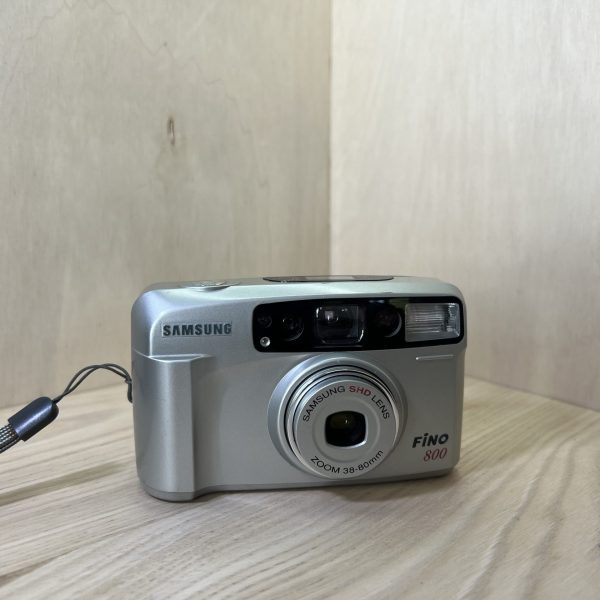
A 38-80 mm zoom, f/6.3-12.3, on the W (wide angle) and T (telephoto) buttons on the back.
The MODE button goes from AUTO to the 2 s delayed release, then to Bulb, then to the self-timer. The self-timer and Bulb return to the default mode after one shot.
The self-timer: the lamp blinks slowly for 7 s, then quickly for 3 s, and the picture is taken. The 2 s delay avoids camera shake when you’re holding the camera in your hand.
Bulb keeps the shutter open as long as you press, 60 s at most, for fireworks and night scenes. Only use it in low light, on a tripod.
Focus lock, for an off-centre subject: aim at it with the target, press halfway, reframe without letting go, then press all the way. Release the shutter button to cancel.
The flash
The FLASH button cycles through the modes. After a battery change, it goes back to automatic red-eye reduction. One press gives auto flash, two fill-in flash, three flash off.
In auto, it fires by itself in low light, depending on how the subject is lit, and not if the subject is brightly lit. Red-eye reduction is for portraits in low light.
Fill-in flash fires whatever the light, for a subject in the shade when the light around it is too strong for auto flash. With the flash off, a tripod avoids camera shake.
Auto flash stays set when you switch the camera off: check the LCD panel when you switch on.
Range at ISO 100: 2.9 m at wide angle and 1.5 m at telephoto. At ISO 400: 5.9 m and 3 m. It recharges in about 7 s.
Good to know
Focus runs from 1 m at wide angle, or 1.2 m at telephoto, to infinity. Any closer, Samsung doesn’t guarantee the quality of the photos. The viewfinder has a close-up framing mark.
The LCD panel shows the frame counter, flash mode, shooting mode, battery status, the rewind indicator and the “E” for a wrongly loaded film. A window on the back lets you see the loaded film.
Pressing the Power button during rewinding interrupts it. It resumes when you let go.
Q.D. version only: it prints the date on the photo (month-day-year, day-month-year or year-month-day), or the day and time, or nothing. On the back, MODE chooses the format, SELECT the day, month or year, and SET adjusts the value, faster if you hold it down. The calendar runs up to 2049.
Care
Wipe it with a soft, lint-free cloth. Only clean the lens with lens tissue and a fluid made for it.
Keep it away from sand and water, store it somewhere dry, cool and dust-free, never in a car in the sun. Avoid knocks, and have it checked after a fall.
It works from -10 to 50 °C. Below 7 °C, keep the camera and batteries warm between shots. When it’s very cold, let it warm up slowly in its case, to avoid condensation.
Don’t take it apart: it contains high-voltage circuits.
Fino 800 specifications
Format
DX-coded 135 film, 24 × 36 mm frames, motorised advance and rewind
Lens
Samsung SHD 38-80 mm zoom, f/6.3-12.3, 4 elements in 4 groups
Focusing
autofocus, from 1 m (38 mm) or 1.2 m (80 mm) to infinity, focus lock available
Shutter
electronic leaf shutter, from 1/3 to 1/250 s, bulb from 1 to 60 s
Metering
programmed automatic exposure, EV 7.2 to 16 at 38 mm and EV 8.9 to 16 at 80 mm (ISO 200 film)
Sensitivity
ISO 50 to 1600, read from the DX code
Viewfinder
Albada-type bright-line frame, over 80% coverage, 0.32 to 0.64 magnification, close-up mark
Flash
built-in, 2.9 m at 38 mm and 1.5 m at 80 mm with ISO 100, recharges in about 7 s
Pay by card, Klarna or Google Pay. Your bank details never pass through us.
Free delivery from €150 in mainland France
Elsewhere, the exact rate is shown before you pay.
Tracked parcels, padded by hand
Tracking number by email, oversized packaging: a camera body doesn’t travel like a book.
Tested second-hand
Mechanics, optics, electronics: every item goes through our testing method before it goes online.
A word about cookies
Those for the basket and payment are essential. The others wait for your consent: audience measurement, advertising, visit tracking for our emails. You can withdraw it whenever you like. Details here.