JVC’s official PDF, which it no longer publishes: the link opens the copy kept by Internet Archive’s Wayback Machine.
Getting started
Battery With the switch on OFF, place the BN-VF707U battery against its mount, arrow pointing down, and slide it down until it locks. Plug in the AP-V14E or AP-V17E AC adaptor: the POWER/CHARGE lamp blinks while charging and goes out when it’s done, after about an hour and a half. To remove the battery, slide BATT.
Hard drive or card Out of the box, it records video and photos to its built-in hard drive. For an SD card, slide it in with the camcorder off, bevelled edge first, format it in the camcorder (MENU, REC MEDIA SETTING, FORMAT), then choose SD under VIDEO MODE or IMAGE MODE in the same menu.
Switching on for the first time Hold down the lock button and set the power switch to record or playback. The menus are in English from the factory: to change the language, open MENU and choose LANGUAGE under DISPLAY. Then set the date and time in MENU, DISPLAY, CLOCK ADJUST.
Filming Remove the lens cover, set the power switch to record and the MODE switch to video. Press the recording start/stop button to film, then again to stop. Push the zoom lever towards T to zoom in, towards W to zoom out.
Playback Set the power switch to playback and MODE to video: the video index screen appears. Choose a file with the direction buttons and start it with the Play/Pause button. During playback, the zoom lever adjusts the speaker volume, and pushed towards W while paused it takes you back to the index.
What it can do
MPEG-2 video at 720 × 576, in four qualities: ULTRA FINE (8.5 Mbit/s), FINE, NORMAL and ECONOMY (352 × 288). Sound is 2-channel Dolby Digital.
15× optical zoom. Beyond that, the digital zoom goes to 60× or 700× (ZOOM menu), with a less detailed picture. At wide angle, it focuses down to about 5 cm.
JPEG photos up to 1152 × 864 pixels, on the hard drive or an SD card, with continuous shooting (one frame about every 0.5 s) and a 2 or 10 s self-timer.
An LED light (LIGHT button), on continuously or automatic, for subjects closer than 1.5 m.
A digital image stabiliser (DIS), a wind noise filter (WIND CUT) and a 16:9 mode (WIDE MODE).
Recording times to plan for
On the GZ-MG50E’s hard drive: 430 minutes in ULTRA FINE, 640 in FINE, 850 in NORMAL and 2,250 in ECONOMY.
On a 1 GB SD card: 14 minutes in ULTRA FINE, 73 in ECONOMY. For video, use a fast card, 10 MB/s at least. MultiMediaCard cards don’t work.
With the BN-VF707U battery: about 1 h of continuous recording, 55 minutes with the LED on. JVC advises having batteries for three times the time you plan to film.
Continuous recording is split into 4 GB files.
Good to know
Drop detection switches the camcorder off if it falls, to protect the hard drive. Set the switch back to OFF, then switch on again. Don’t knock or shake the hard drive.
While the ACCESS lamp is lit or blinking, don’t switch off or remove the battery or the adaptor.
Format the hard drive or card in the camcorder, never on a computer, and plug in the AC adaptor to format or clean up a medium.
The clock battery runs down after about 3 months without use: plug in the adaptor for more than 24 hours, then set the date and time.
On battery, it switches off after 5 minutes without use: set the switch back to OFF, then switch on again. If it overheats, the REC lamp blinks: switch it off and let it cool down.
On a TV
Plug the AV cable into the AV socket, under a cover: yellow plug to the video input, white and red to the audio input. There is also an S-Video output, with the YTU94146A cable.
It outputs a PAL signal only: a TV using another standard won’t display it.
Preferably run it on mains power, and turn the TV volume down before switching it on.
Everio GZ-MG50E specifications
Media
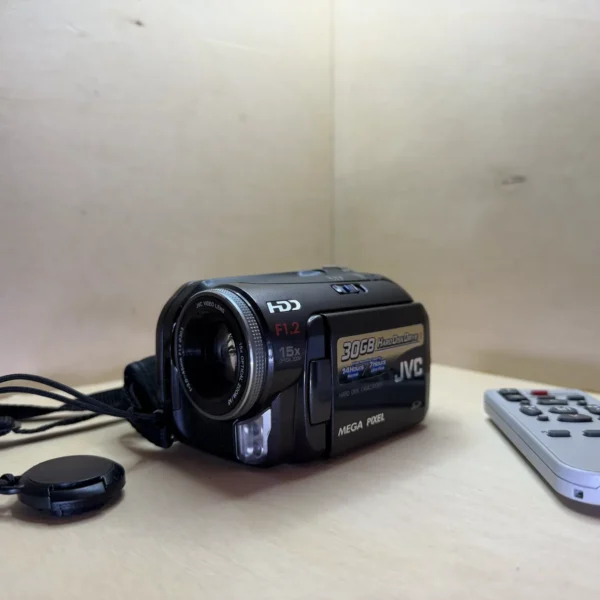
built-in 30 GB hard drive, SD card
Sensor
1/4.5-inch CCD, 1,330,000 pixels
Lens
3.0-45 mm, f/1.2-2.8, 15× optical zoom (700× digital), 30.5 mm filter thread
Screen
2.5-inch TFT LCD, swivels through 270°
Video
MPEG-2 (SD-VIDEO), 720 × 576, PAL, up to 8.5 Mbit/s
Photo
JPEG, 1152 × 864, 1024 × 768 or 640 × 480
Audio
2-channel Dolby Digital, stereo microphone
Battery
BN-VF707U lithium-ion, AP-V14E or AP-V17E AC adaptor
Outputs
AV, S-Video, mini USB-B (USB 1.1 and 2.0)
Dimensions and weight
67 × 70 × 109 mm, 320 g without battery, 380 g with battery, lens cover and strap
Pay by card, Klarna or Google Pay. Your bank details never pass through us.
Free delivery from €150 in mainland France
Elsewhere, the exact rate is shown before you pay.
Tracked parcels, padded by hand
Tracking number by email, oversized packaging: a camera body doesn’t travel like a book.
Tested second-hand
Mechanics, optics, electronics: every item goes through our testing method before it goes online.
A word about cookies
Those for the basket and payment are essential. The others wait for your consent: audience measurement, advertising, visit tracking for our emails. You can withdraw it whenever you like. Details here.