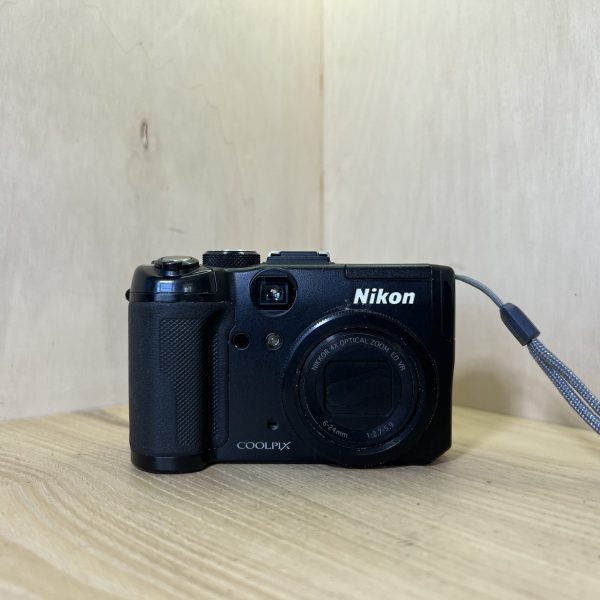
Battery Open the battery/card compartment cover. Slide in the EN-EL5 battery, terminals as shown on the label, pushing the orange latch up with it: the latch springs back once it is in place. Close the cover and slide its latch.
Charging The battery charges in the camera while it is off: plug the EH-66 AC adapter into the DC input socket, then into the mains. The power-on lamp and the AF lamp blink while it charges, about three hours for a flat battery, in a room between 5 and 35 °C.
Card With the camera off, slide an SD card into the same compartment until it clicks. With no card, it records to its internal memory of about 48 MB. Format a card that comes from another camera in this camera, never on the computer.
Switching on for the first time Press the power switch. The first time you turn it on, choose the language (French is available), answer Yes to set the clock, choose your time zone and daylight saving time, then the date and time.
Your first photo Turn the mode dial to Auto. Press the shutter button halfway: the focus area turns green when the image is sharp, then press all the way down. With the flash lowered, it doesn’t fire: its pop-up control raises it.
What it can do
The P, S, A and M modes on the dial: you choose the shutter speed, the aperture or both yourself. Your usual settings are saved on the U1 and U2 positions.
A built-in GPS: GPS position on the dial, then MENU, Record GPS data set to On. It writes latitude and longitude into the photos. Go out into the open: the first fix can take several minutes.
RAW: NRW (RAW) image quality, alone or with a JPEG, in P, S, A, M, U1 and U2 modes. The playback menu then makes JPEGs from them (NRW processing).
Movie clips with sound, at 640 × 480 and 30 frames per second or at 320 × 240. The optical zoom is locked once recording has started.
The flash
The built-in flash pops up with its control. To put it away, push it down gently until it clicks.
The hot shoe takes Nikon SB-400, SB-600, SB-800 and SB-900 flashes directly. Remove the hot shoe cover first. The built-in flash then turns itself off.
Good to know
Left On, the GPS keeps measuring the position with the camera off, six times at 90-minute intervals, and the battery drains faster. Turn it off on a plane or in hospital.
Once the clock is set, plugging in the adapter first starts Picture Bank, which uploads photos to my Picturetown. Press OK to cancel it and start charging.
The optical viewfinder doesn’t show exactly what the photo will be: frame on the screen at 1 m or less, with the digital zoom or with a converter.
Left idle, it turns itself off after three minutes. Recharge a battery you aren’t using once every six months.
Coolpix P6000 specifications
Sensor
1/1.7-inch CCD, 13.5 million effective pixels
Lens
4× Nikkor zoom, 6-24 mm (28-112 mm, 35 mm equivalent), f/2.7-5.9
Stabilisation
lens-shift and sensor-shift vibration reduction
Sensitivity
ISO 64 to 6400, Auto from ISO 64 to 800
Shutter
1/2000 to 8 s, up to 30 s in M mode
Screen and viewfinder
2.7-inch LCD, about 230,000 dots, optical viewfinder
Video
640 × 480 at 30 frames per second, with sound (AVI)
Battery
EN-EL5 lithium-ion, about 260 shots (CIPA standard)
Card
SD, internal memory of about 48 MB
Dimensions and weight
about 107 × 65.5 × 42 mm, 240 g without battery or card
Pay by card, Klarna or Google Pay. Your bank details never pass through us.
Free delivery from €150 in mainland France
Elsewhere, the exact rate is shown before you pay.
Tracked parcels, padded by hand
Tracking number by email, oversized packaging: a camera body doesn’t travel like a book.
Tested second-hand
Mechanics, optics, electronics: every item goes through our testing method before it goes online.
A word about cookies
Those for the basket and payment are essential. The others wait for your consent: audience measurement, advertising, visit tracking for our emails. You can withdraw it whenever you like. Details here.