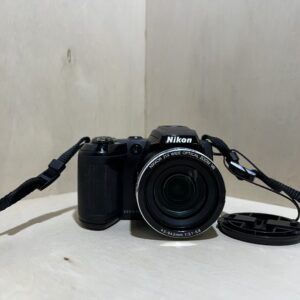
Battery If it is on a tripod, take it off first. Slide the battery cover latch, insert a charged EN-EL1 battery or a new 2CR5 (DL245) lithium battery in the direction shown on the cover, then close and lock it.
Charging The EN-EL1 charges in its charger, outside the camera: the manual refers you to the charger’s instructions. For long sessions, it also takes the EH-21 or EH-53 AC adapter, sold as options.
Card With the camera off, open the card slot cover and check that the eject button is pushed in. Slide in the CompactFlash card or Microdrive, contacts first, rear label facing you. Format a card that comes from another device in the camera (SET-UP menu, CF Card Format).
Switching on for the first time Turn the power switch: the power-on lamp lights up. In playback mode, press MENU, open SET-UP, then Language (En for English). Then set the Date: year, month, day, hour, minutes and display order.
Your first photo Remove the lens cap. Press MODE and turn the command dial to the AUTO icon. Press halfway: the green lamp next to the viewfinder lights up when the image is sharp, then gently press all the way.
What it can do
The lens unit swivels 210° forwards and 90° backwards. Turned the same way as the screen, it lets you take a self-portrait at arm’s length. The screen then shows a mirror image.
P, S, A and M modes on top of Auto mode and sixteen Scene modes. In M, Bulb keeps the shutter open for up to 5 minutes.
Macro mode focuses down to 2 cm, in the middle of the zoom range: the macro icon then turns yellow.
Movies of up to 35 seconds, at 320 × 240 and about 15 frames per second, with sound, in P, S, A or M modes (Shooting menu, Movie). The optical zoom is locked during recording.
HI quality records uncompressed TIFF files, at 2272 × 1704 or in 3:2, in P, S, A and M modes.
Good to know
The viewfinder covers about 80% of the image: closer than 90 cm, with digital zoom or in 3:2, frame on the screen instead.
While the green lamp blinks, it is saving: don’t switch off, and don’t remove the card or the battery.
If the eject button is out when you close the cover, the card pops halfway out and the camera shows errors the next time you switch it on.
A small internal battery keeps the time: it charges while the main battery is in place, about 10 hours for roughly three days of backup. If the clock icon blinks, set the date again.
It switches itself off after 1 minute of inactivity. SET-UP menu, Auto Off: 30 s, 1, 5 or 30 minutes.
The flash
The built-in flash pops up by itself in low light, at the half-press. Don’t lift it by hand and keep your fingers away from the top.
Range: 0.5 to 1.6 m at wide angle, 0.5 to 3 m at telephoto. Closer than 50 cm, in macro, it may light unevenly: check on the screen.
To put it away, press straight down on it, never on the front, back or sides.
A sync socket takes, via the SK-E900 bracket, the Nikon SB-80DX, SB-30, SB-28DX, SB-28, SB-26, SB-25, SB-24, SB-22 and SB-22s flashes.
Care
In severe cold, the battery weakens: keep a spare battery warm and swap them over. Once warmed up, it regains some of its capacity.
Before going from the cold into the warm, slip it into a plastic bag or a case to avoid condensation.
For long storage: lens unit in its storage position, battery removed, somewhere cool, dry and well ventilated. Take it out once a month and fire the shutter a few times.
Coolpix 4500 specifications
Sensor
1/1.8-inch CCD, 4 million effective pixels
Lens
4× Zoom-Nikkor, 7.85-32 mm (38-155 mm in 35 mm equivalent), f/2.6-5.1, 4× digital zoom
Focusing
contrast-detect autofocus, 5 areas or spot, 30 cm to infinity (50 cm at wide angle), 2 cm in macro
Shutter
electronic and mechanical, 8 s to 1/2300 s depending on the mode, Bulb up to 5 min in manual
Sensitivity
ISO 100, 200, 400, 800 or Auto (up to ISO 800)
Screen and viewfinder
1.5-inch screen, 110,000 pixels, optical zoom viewfinder, about 80% of the image
Files
JPEG (FINE, NORMAL, BASIC) and TIFF (HI), 2272 × 1704 max, QuickTime movies at 320 × 240
Battery
EN-EL1 lithium-ion or 6 V 2CR5 (DL245) lithium battery, about 100 minutes (Nikon test at 20 °C)
Card
CompactFlash type I and II, Microdrive
Weight and dimensions
about 360 g without battery or card, 130 × 73 × 50 mm
Pay by card, Klarna or Google Pay. Your bank details never pass through us.
Free delivery from €150 in mainland France
Elsewhere, the exact rate is shown before you pay.
Tracked parcels, padded by hand
Tracking number by email, oversized packaging: a camera body doesn’t travel like a book.
Tested second-hand
Mechanics, optics, electronics: every item goes through our testing method before it goes online.
A word about cookies
Those for the basket and payment are essential. The others wait for your consent: audience measurement, advertising, visit tracking for our emails. You can withdraw it whenever you like. Details here.