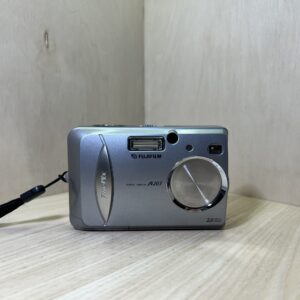
Fujifilm’s official PDF, which it no longer publishes: the link opens the copy kept by Internet Archive’s Wayback Machine.
Getting started
Batteries Slide the battery compartment cover to open it and insert two AA batteries, alkaline or Ni-MH, matching the + and − marks on the camera. Always use two new batteries of the same brand and type. No lithium, manganese or nickel-cadmium batteries.
Card It records on an xD-Picture Card, from 16 to 128 MB, in the same compartment. Line up the arrow on the card with the one on the camera, push it all the way into its slot and close the cover. To remove it, push it in, then gently let go: it pops out by itself.
Date and time Slide the POWER switch: the viewfinder lamp lights up green. The first time you switch on, the DATE/TIME NOT SET screen appears: press MENU/OK, move from the year to the minutes with the left and right arrows, set each figure with up and down, then confirm with MENU/OK.
Language Press MENU/OK, choose SET-UP in the OPTION menu and confirm. Scroll down to LANGUAGE and press the right arrow to switch between ENGLISH, FRANCAIS and DEUTSCH, then confirm with MENU/OK.
Your first photo Turn the mode dial to still image and place the subject, at least 60 cm away, in the AF frame. Press halfway: the frame shrinks and the green viewfinder lamp stays steady when it’s in focus. Press all the way: a beep, and the photo is taken.
What it can do
A 3× optical zoom, from 38 to 114 mm in 35 mm equivalent. Beyond that, the digital zoom takes over on the screen, except at 2048 × 1536: 1.3× at 1600 × 1200, 1.6× at 1280 × 960, 3.2× at 640 × 480.
A Movie mode on the dial: video without sound, 10 frames per second, at 320 × 240 (60 seconds maximum per clip) or 160 × 120 (240 seconds). While filming, only the digital zoom works, up to 3.2×, and focus is fixed from 80 cm to infinity.
A Macro mode on the dial, from 10 to 80 cm (30 to 80 cm with the flash). The zoom stays at wide angle and the screen stays on: frame on the screen, as the viewfinder doesn’t show the right field that close up.
In Manual mode (OPTION menu), you set exposure compensation, from −2.1 to +1.5 EV in steps of about 0.3 EV, and white balance to suit the lighting.
A 10-second self-timer on the dial: the lamp stays lit for 5 seconds, then blinks for 5 seconds. The BACK button stops it.
The flash
Five modes with the flash button: Auto, red-eye reduction, forced flash, flash off and slow sync for night portraits.
Range in Auto mode: 0.3 to 3.5 m at wide angle, 0.6 to 3 m at telephoto.
The viewfinder lamp blinks orange while the flash charges. Charging takes longer as the batteries run down.
Good to know
Leave the POWER SAVE setting in the SET-UP menu on ON with alkaline batteries: the screen switches off after 30 seconds without use, then the camera switches off 90 seconds later.
Turn off the screen with the DISP button and use the viewfinder to make the batteries last: about 200 shots instead of 150 with alkalines. Between 0.8 and 1.5 m, the viewfinder doesn’t show exactly the field being photographed: frame on the screen instead.
At 10 °C or below, batteries run down much faster, especially alkalines: keep them warm in a pocket before putting them in.
If the batteries have been in the camera for less than 20 minutes, it may forget its settings when you change the batteries or the card. Left without batteries for a long time, it loses the date and time.
Format a new card, or one that has been in a computer, in the camera: in playback, MENU/OK, ERASE, then FORMAT. Formatting erases everything, even protected images.
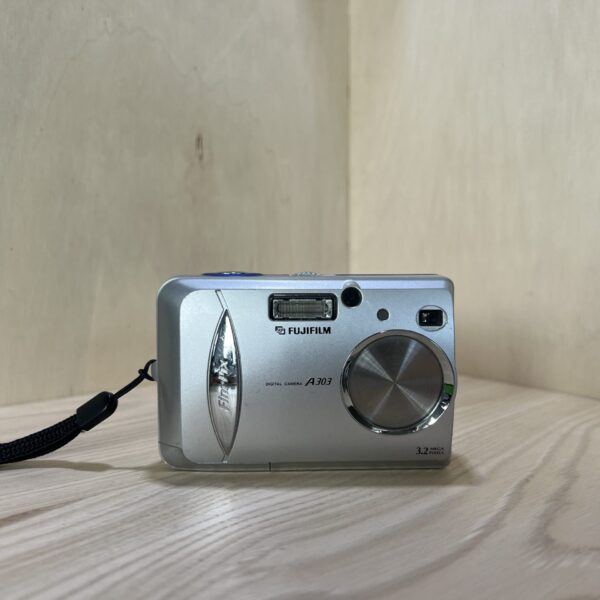
FinePix A303 specifications
Sensor
1/2.7-inch CCD, 3.2 MP effective, images up to 2048 × 1536
Lens
Fujinon 3× zoom, 5.7-17.1 mm (38-114 mm in 35 mm equivalent), f/2.8-4.8, or f/7-11.6 chosen automatically
Focusing
autofocus, 60 cm to infinity, macro from 10 to 80 cm
Exposure
64-zone TTL metering, programmed auto, ISO 100, 1/2 to 1/2000 s
Screen and viewfinder
1.5-inch TFT screen with 60,000 dots, optical viewfinder covering 80% of the image
Video
Motion JPEG (AVI), 320 × 240 or 160 × 120, 10 frames per second, no sound, 60 or 240 seconds per clip
Flash
built in, 5 modes, 0.3 to 3.5 m at wide angle, 0.6 to 3 m at telephoto
Power
2 AA alkaline batteries (about 150 shots with the screen on, 200 with it off) or Ni-MH (200 and 300 shots), optional AC-3V AC adapter
Card
xD-Picture Card, from 16 to 128 MB
Dimensions and weight
97 × 63.9 × 34.3 mm, 145 g without batteries or card, about 200 g ready to shoot
€70.00Original price was: €70.00.€62.00Current price is: €62.00.
Secure payment
Pay by card, Klarna or Google Pay. Your bank details never pass through us.
Free delivery from €150 in mainland France
Elsewhere, the exact rate is shown before you pay.
Tracked parcels, padded by hand
Tracking number by email, oversized packaging: a camera body doesn’t travel like a book.
Tested second-hand
Mechanics, optics, electronics: every item goes through our testing method before it goes online.
A word about cookies
Those for the basket and payment are essential. The others wait for your consent: audience measurement, advertising, visit tracking for our emails. You can withdraw it whenever you like. Details here.