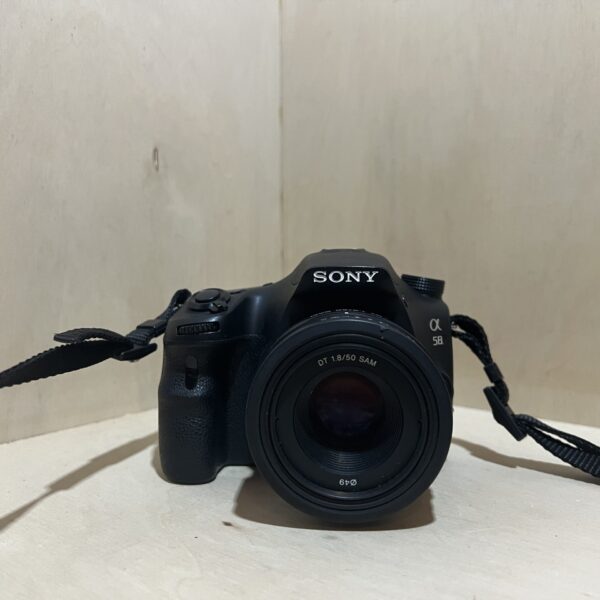
Sony Alpha 58 (SLT-A58): manual and user guide
The 20 MP Sony with a translucent mirror and an A mount. Its official PDF manual, then the essentials for using it.
Open the official manualα Handbook · Sony PDF (in French)
The PDF opens directly, served by Sony. Source: its official support page.
Getting started
- Charging Slide the NP-FM500H battery into the BC-VM10A charger until it clicks, then plug the charger into a wall socket. The CHARGE lamp stays lit while charging and goes out when it’s done: about 175 minutes for a flat battery. Ideally charge it between 10 and 30 °C.
- Battery and card Slide the lever to open the battery cover and push the battery all the way in: its end pushes the lock lever aside. Then open the card cover and insert a Memory Stick PRO Duo or an SD, SDHC or SDXC card, notched corner the right way round, until it clicks. To shoot video on an SD card, use class 4 or faster.
- Lens Remove the body cap and the rear lens cap. Line up the orange marks on the lens and the camera, then turn the lens clockwise until it clicks, without pressing the release button. Do it quickly and away from dust.
- Switching on for the first time Set the power switch to ON: the date and time setting screen opens. Confirm Enter in the centre of the control button, choose your area, then daylight saving time, the date format, the date and time, and confirm Enter. Change the menu language via MENU, spanner tab, page 3, Language line.
- Your first photo Set the mode dial to Intelligent Auto, or to Flash Off where flash isn’t allowed: the camera recognises the scene. Put the AF area on your subject, press the shutter button halfway until the focus indicator lights up, then press all the way. To film, press the MOVIE button, and press it again to stop.
What it can do
- Full HD 1920 × 1080 video in AVCHD (60i/50i or 24p/25p), or in MP4 1440 × 1080 and VGA, with a stereo microphone. In autofocus, focus follows the subject while filming. A continuous take stops at 29 minutes.
- SteadyShot moves the sensor to reduce camera shake in photos, by about 2.5 to 4.5 EV depending on the lens and conditions. In video, it’s electronic. It’s on by default.
- Tele-zoom Continuous Priority AE mode crops the centre of the image and shoots up to about 8 frames per second, at size S. Otherwise, bursts go up to 5 frames per second.
- Sweep Panorama mode: with the shutter button held down, you sweep across the scene following the guide bar on the screen.
- The screen tilts about 55° down and 135° up.
The flash
- In Intelligent Auto, Superior Auto and Scene Selection, it pops up by itself when light is low or the subject is backlit. In the other modes, press the flash button to release it.
- Choose the mode with the Fn button: Flash Off, Autoflash, Fill-flash, Slow Sync., Rear Sync. or Wireless, to fire an external flash remotely. In P, A, S and M, push it back down if you don’t want flash.
- While its indicator is blinking, it’s charging and the shutter button doesn’t respond.
- Guide number 10 (in metres at ISO 100), sync at 1/160 s. At f/2.8 and ISO 100, it reaches from 1 to 3.6 m. Remove the lens hood, as it can block its light.
Which lenses?
- It takes Sony A-mount lenses. E-mount lenses aren’t compatible.
- DT lenses are made for APS-C sensors like its own. They aren’t suitable for 35 mm cameras.
- For a lens other than the DT 18-55, 18-135 and 55-200 mm kit zooms, follow its own manual too.
- To remove it, press the release button all the way in and turn the lens anticlockwise as far as it goes, then put the caps back on.
Good to know
- The mirror is a transparent film: never touch it, you’d dirty or warp it. Remove dust with a blower brush, not a spray can.
- If dark spots appear on your photos, go to MENU, spanner tab, page 3, Cleaning Mode: the sensor vibrates for a moment to shake off the dust.
- A small internal battery keeps the date and settings. After 3 months without use, it’s flat: put in a charged battery and leave the camera switched off for at least 24 hours.
- Format the card in the camera (MENU, Format), not on the computer. An SDXC card uses exFAT: if a non-compatible device offers to format it, say no, or you’d lose everything.
- Turn the dioptre adjustment dial until the viewfinder looks sharp.
Alpha 58 (SLT-A58) specifications
- Sensor
- 23.2 × 15.4 mm APS-C CMOS, 20.1 effective MP, stabilised by sensor shift
- Mount
- Sony A, E-mount lenses not compatible
- Focusing
- TTL phase-detection autofocus, 15 AF points including 3 cross-type
- Viewfinder and screen
- 1.0 cm electronic viewfinder, 1,440,000 dots, 100% coverage, dioptre adjustment from -4 to +4, 6.7 cm (2.7-inch) tilting LCD screen, 460,800 dots
- Shutter
- 1/4000 s to 30 s and bulb, flash sync at 1/160 s
- Sensitivity
- ISO 100 to 16,000, ISO 100 to 3200 in auto and video
- Video
- AVCHD 1920 × 1080 (60i/50i, 24p/25p) or MP4 1440 × 1080 and VGA, stereo sound
- Power
- NP-FM500H lithium-ion battery, BC-VM10A charger, about 690 shots with the viewfinder, 700 with the screen (CIPA standard)
- Card
- Memory Stick PRO Duo, Memory Stick XC Duo, SD, SDHC, SDXC
- Dimensions and weight
- about 128.6 × 95.5 × 77.7 mm, 492 g body only, 573 g with battery and card
In the shop
The Sony Alpha 58 (SLT-A58) in the workshop
Filter
Showing the single result
Goes well with
Complete your kit
Accessories in stock that travel in the same parcel.
In the same category
The same kind of camera, available
More items from the same category, tested and checked in our workshop.