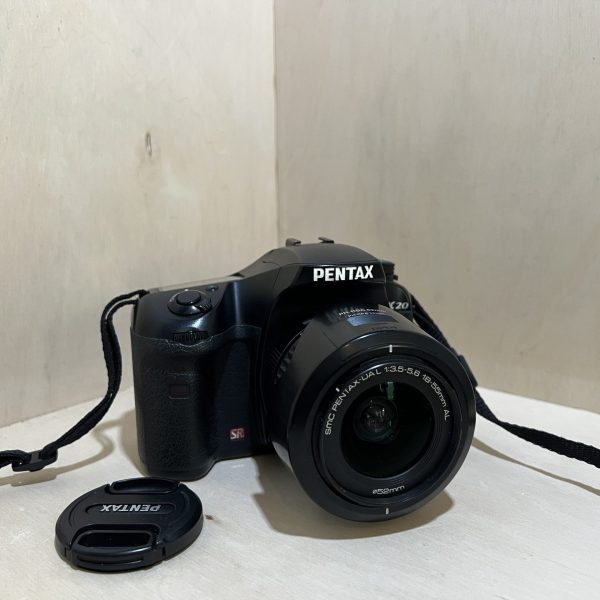
Pentax K20D: manual and user guide
The 14.6 MP Pentax DSLR with a stabilised sensor. Its official manual as a PDF, then the essentials to get you started.
Open the official manualOperating Manual · Pentax PDF · 288 pages · 6.7 MB (in English)
The PDF opens directly, hosted by Pentax. Source: its official support page.
Getting started
- Battery It only takes the D-LI50 battery. Lift the cover lever, turn it to OPEN, then slide the battery in, mark towards the screen, while pushing the latch. Close the cover and turn the lever to CLOSE.
- Charging Place the battery mark side up in the D-BC50 charger: the light stays red while charging and goes off when it’s done. Allow 180 minutes at most, between 0 and 40°C.
- Card It takes SD or SDHC cards. Open the cover with its lever, push the card in label towards the screen, and close it properly: it won’t switch on with the cover open. Format a card that’s been used elsewhere in the camera.
- Switching on for the first time Set the switch to ON. The first time, it asks for the language (English is available), then the date and time. It switches itself off after 1 minute of inactivity, which you can change in the Set-up menu.
- Your first photo Mode dial on the green position, focus mode lever on single AF. Aim, press halfway: the focus indicator lights up in the viewfinder. Press all the way down. The flash doesn’t pop up by itself: its button raises it.
Mode dial settings
- Green: fully automatic. Hyper Program: it chooses the shutter speed and aperture, and the two dials switch you to shutter or aperture priority.
- Sensitivity Priority: you set the ISO, it sets the shutter speed and aperture. Shutter & Aperture Priority: you set both, it adjusts the ISO.
- Shutter priority, aperture priority, and Hyper Manual, where you set everything. B for long exposures, X for an external flash at 1/180 s, USER for your saved settings.
Stabilisation and sensor
- SR stabilisation moves the sensor: it works with any compatible Pentax lens and lets you shoot about 4 stops slower.
- With a lens that doesn’t pass on its focal length, it asks you for it in the Input Focal Length menu.
- Turn SR off on a tripod. It turns itself off with the self-timer, the remote control and in Bulb.
- With a lens whose aperture ring isn’t set to A, first allow use of the ring in Custom Function 36.
- The sensor shakes itself to remove dust (Dust Removal), and an alert shows up any that remains.
Good to know
- For the 35 mm equivalent, multiply the focal length by about 1.5: an 18-55 mm frames like a 27-83 mm.
- Dials, buttons, joints and retractable parts are splash- and dust-resistant.
- It records RAW (PEF or DNG), JPEG or both at once, and can process RAW files in camera.
K20D specifications
- Sensor
- 23.4 × 15.6 mm CMOS, 14.6 MP effective
- Lens
- Pentax K mount (KAF2), focal length × about 1.5 in 35 mm equivalent
- Stabilisation
- SR by sensor shift, about 4 stops
- Viewfinder
- pentaprism, 95% coverage, about 0.95× magnification
- Screen
- 6.9 cm (2.7 in), about 230,000 dots, Live View on the screen
- Burst
- about 3 frames per second
- Battery
- D-LI50 lithium-ion, about 740 shots without flash, 530 with flash on every other shot (23°C)
- Card
- SD, SDHC
- Factory reset
- Set-up menu, then Reset. Custom settings are reset separately (Reset Custom Function)
In the shop
The Pentax K20D in the workshop
Filter
Showing the single result
Goes well with
Complete your kit
Accessories in stock that travel in the same parcel.
In the same category
The same kind of camera, available
More items from the same category, tested and checked in our workshop.